Visual notes (plans, reviews, designs)
When to read this. You want a document that reads better than a wall of prose — wireframes, diagrams, data models, API contracts, annotated diffs — reviewable inside condash, living as a plain file in the project item.
A visual note is an .mdx file in a project item's notes
(notes/NN-<slug>.mdx). It is MDX used as data, never as code: ordinary
Markdown prose interleaved with typed blocks — capitalized tags whose props are
static JSON literals. condash renders it in the in-app viewer and validates it
with condash mdx check. Everything is local files; there is no hosted service.
The condash-shipped /visual skill authors them all. One skill, one
dialect; a frontmatter kind picks the posture and what the open questions
ask:
design— approaches still being weighed; the form asks directions.plan— the reviewable approval gate before code; the form asks approval.review— the same dialect driven backwards from a worktree's diff, so a reviewer scans the shape of a change before the raw diff; the form asks feedback.note— the default whenkindis omitted: a layout of blocks where prose would be worse, with nothing to decide.
The dialect in 30 seconds
---
title: Add session refresh
kind: plan
---

## Goal

Refresh tokens without re-login.

<DataModel id="sessions" entities={[{ id: "sessions", name: "sessions", fields: [
  { name: "id", type: "uuid", pk: true },
  { name: "refresh_at", type: "timestamptz", change: "added" },
] }]} />

<Diff id="d1" filename="src/auth.ts" language="ts" mode="split"
  before={"const ttl = 3600;\n"} after={"const ttl = 900;\n"} />
- Frontmatter carries
titleand an optionalkind(design/plan/review/note, defaultnote). - Prose between blocks is normal Markdown (wikilinks, mermaid fences, and
relative images all work exactly as in
.mdnotes). - Block props are static literals only — no imports, no expressions, no
${…}interpolation. That is what lets condash render agent-authored files with no code execution. - The full vocabulary (~20 block types) comes from
condash mdx blocksor the/visualskill'sblocks.md— one generated document, drift- tested against the registry the parser and viewer share.
Viewing
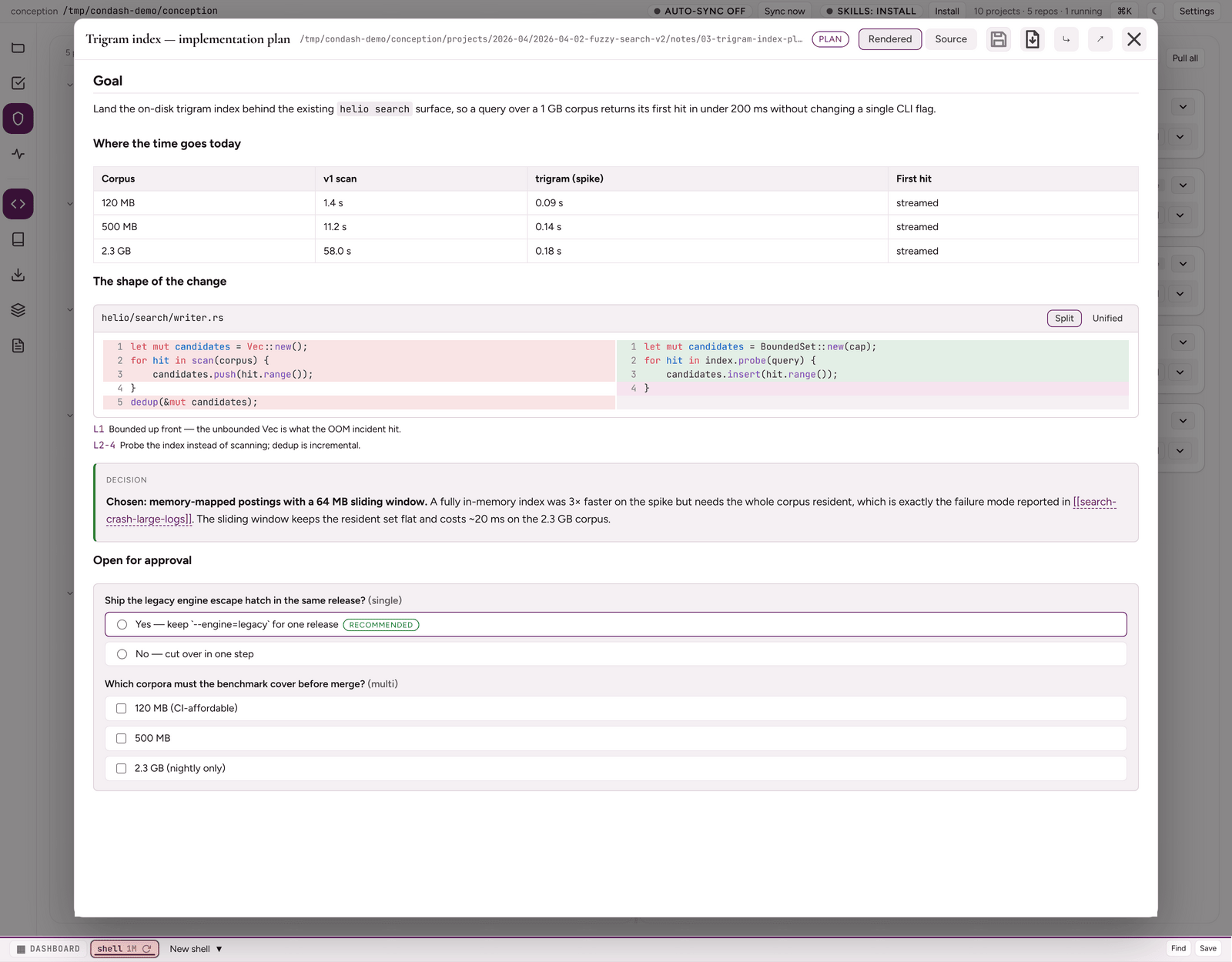
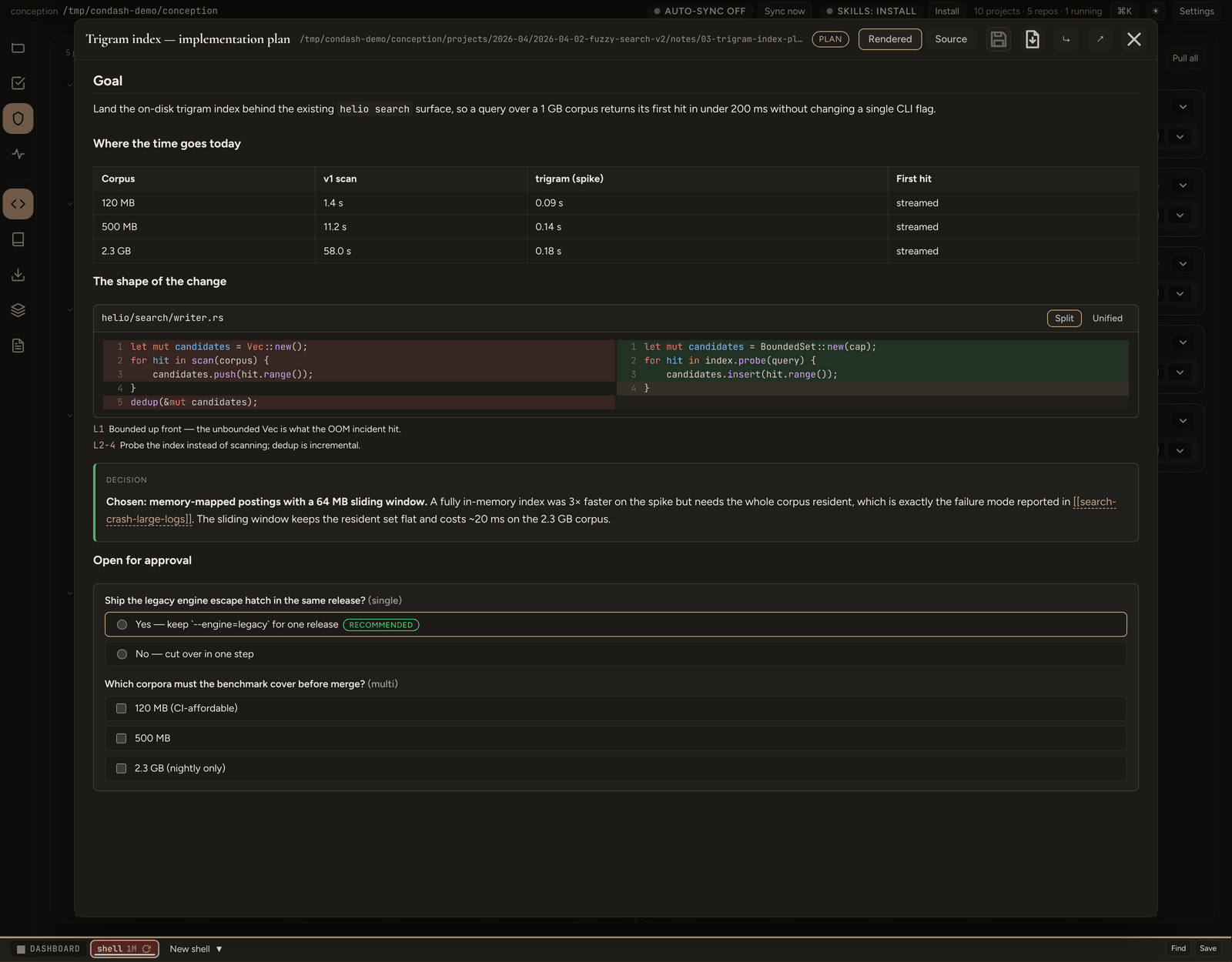
Any .mdx file opens in the viewer — from an item's ## Deliverables
entry, the Resources pane, or an .mdx link inside a note. The viewer renders each
block natively (split diffs, collapsible endpoints, JSON explorers, themed
wireframes), shows parse/validation issues in a banner, renders an invalid
block as a labeled placeholder instead of blanking the document, and carries
a Rendered / Source toggle. Every top-level block fills the document the
way a classic .md note does — no centred reading measure. Wireframe and
diagram HTML is sanitized and themed through --wf-* tokens, so screens read
correctly in light and dark.
Export as PDF (head button, rendered mode) prints the document you see —
form answers as ticked, mermaid re-rendered light, inline SVG kept as vector
— through the same hidden-window printToPDF path as the markdown note
viewer, to a path you pick (default <note>.pdf beside the note).
svg blocks — hand-authored inline SVG diagrams — draw on a light card
in both themes and open in a lightbox on click: Fit / 1:1, Copy SVG, and
Download .svg, which saves a standalone file (xmlns, the block's CSS
embedded, --wf-* tokens resolved) wherever you pick (default
<note>-<block-id>.svg beside the note). The markup is sanitized with an
SVG-only allow-list; <style>, <script>, <foreignObject>, <use> and
the animation family are dropped, and condash mdx check warns on each
before you open the viewer.
Question-forms are answered in place, and the document saves as a whole:
answer as many forms as you like, then save once with the head Save button or
Ctrl+S — every pending answer is written back into the .mdx in a single
pass. A dot next to the button marks unsaved answers, and closing the viewer
with answers still pending offers Save / Discard / Cancel rather than dropping
them.
Canvas boards and prototypes (canvas.mdx / prototype.mdx) are not
supported — flows are expressed as ordered wireframe blocks in the document.
Validating
condash mdx check <item>/notes/03-auth-plan     # folder holding plan.mdx
condash mdx check path/to/file.mdx              # or a file directly
The check runs the same parser and schemas the viewer renders, so a green
check means the document parses and matches the viewer — there is no separate
lint to drift. It does not prove every block has visible content: check
warns when a block would render blank (an unfolded diagram, an empty code or
diff, a wireframe with no html), so read the warnings and open the document
in the viewer once before hand-off. Errors exit 3 with line numbers; kind is
optional and never warns.
Where documents live
| Piece | Convention |
|---|---|
| File | projects/…/<item>/notes/NN-<slug>.mdx (supporting files in notes/NN-<slug>/) |
| README | indexed in ## Notes; step lines say — see note NN |
| Card | add a ## Deliverables entry when the document is a designated output |
| Kind | design / plan / review / note in frontmatter (optional; default note) |
The review unit is the project item's worktree branch — potentially
several app repos under <worktrees_path>/<branch>/ — diffed against each
repo's base; multi-repo reviews group blocks per #handle.