The Code pane
Audience. Daily user.
When to read this. You want to know what each row, tag, and badge in the Code pane means — or how a project's branch: field turns into a real checkout on disk.
The Code pane is the right-hand working surface that shows the git repos this conception cares about (Ctrl+Shift+C, or the rail's first right-pane item). It is a view, not a manager: it renders the configured repositories and their on-disk state, and it launches things (a shell, your IDE, a dev server). It never edits or runs your code — your IDE does that via the open_with slots (Non-goals). The JSON that configures everything on this page lives in Repositories and open-with launchers; this page is about what you see.
Cards, rows, and the primary worktree
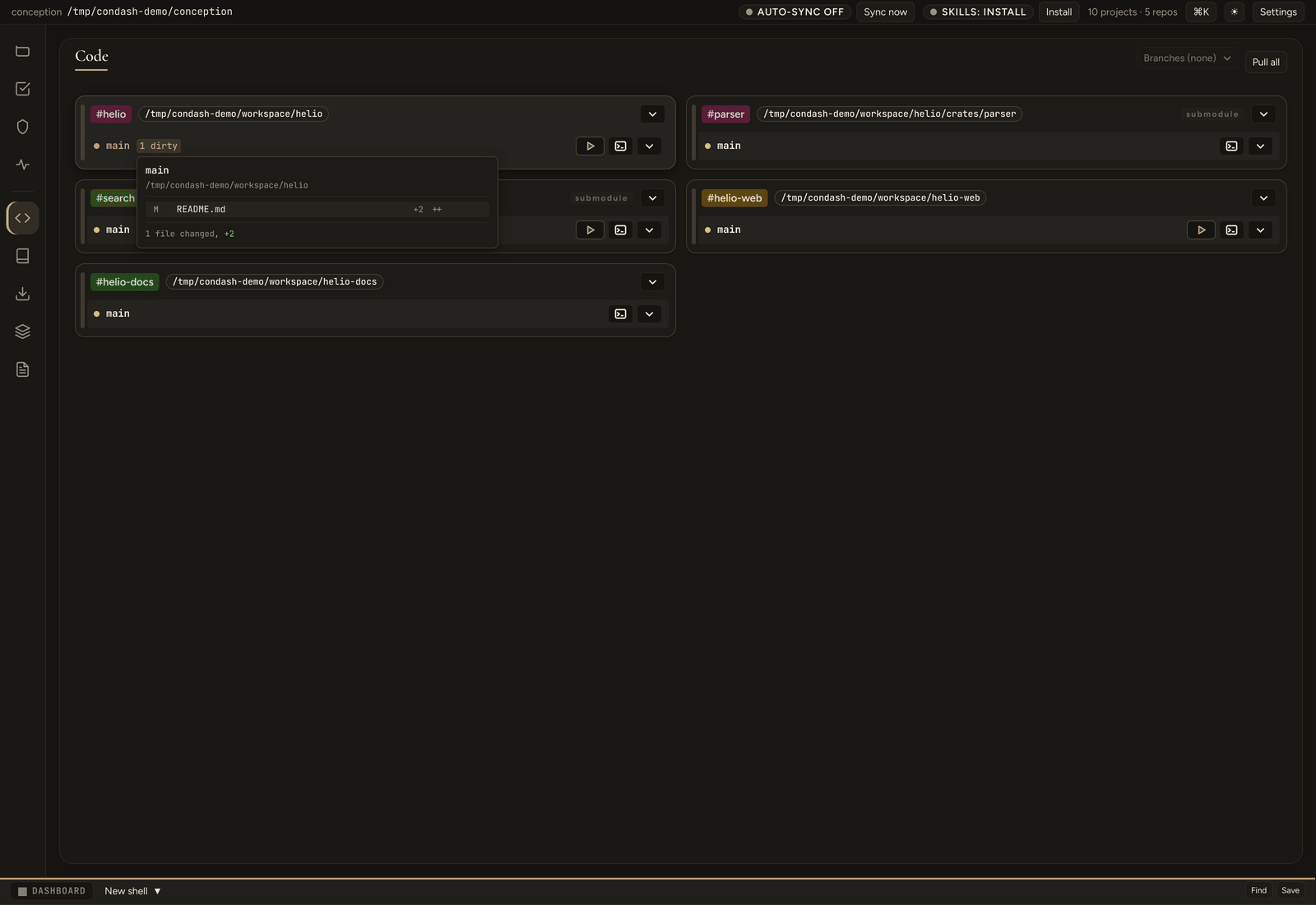
- One card per configured repository, rendered in declaration order and flowing left to right, then down, once the pane is wide enough for more than one column. The card header carries the
#handlepill (its colour is hashed from the handle alone, so it is stable for a given repo but carries no grouping meaning), the repo's path chip, and a Repo actions menu. - Rows inside a card are checkouts: the primary worktree row — the repo as checked out under
workspace_path— is always visible and gets a subtly tinted background so it reads as the always-on reference row. Every other row is a branch, with its own worktree checkout underworktrees_path(see Branches and worktrees below). Each row keeps its own dirty count and its own actions. - The
N dirtypill on a row counts modified files in that checkout; clicking it pops a list of the files.
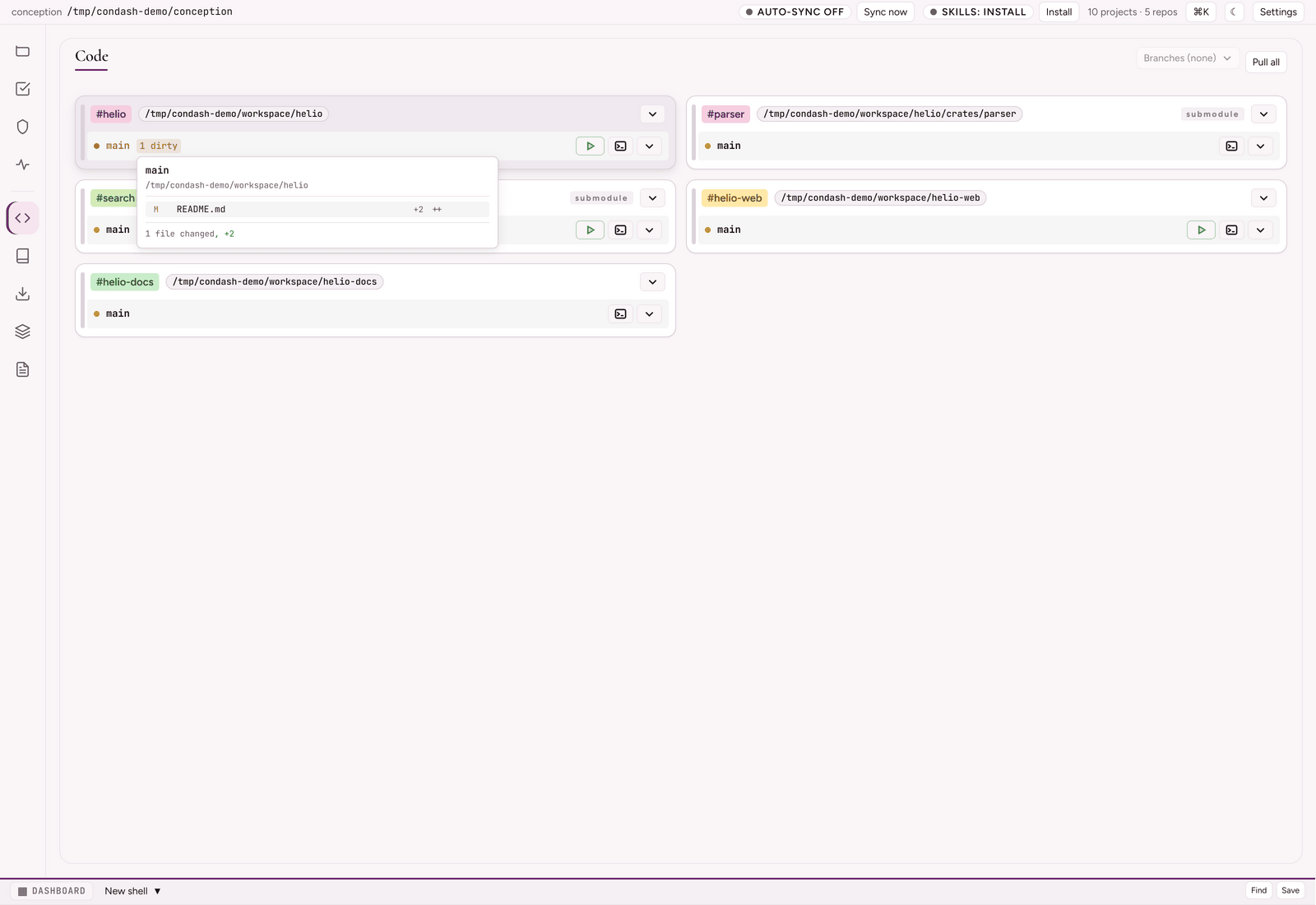
The actions live on each branch row, not on the card:
- Run / Stop — only when that repo has a
run:command configured; it spawns a dev server as a PTY-owned child of condash and streams its output into an xterm under the row. See inline dev-server runner. - Open a shell here — spawns a condash terminal tab with its cwd in that checkout.
- Open with… ▾ — a dropdown holding your configured launchers (main IDE, secondary IDE, external terminal), plus Open in file manager, Pull branch, and Open PR #N when
ghfinds one.
None of these open or edit a source file in condash itself — they hand the checkout to your own tools.
Pinning branches across cards
Click the Branches button at the top of the pane to open the pin selector. The popover's quick-action buttons switch between two explicit modes, and ticking an individual branch implies the third:
- All (sticky) — show every branch on every card and auto-pin any branch that appears later (e.g. one you've just created). The default on a fresh install.
- None — show only the primary row on every card.
- Custom — ticking an individual branch implicitly drops out of sticky-all into a hand-picked set. Each card then renders just its primary row plus any rows whose branch is in your pinned set, and is a silent no-op on cards that don't carry those branches.
The mode and the selection persist per-machine in settings.json under selectedBranches + branchFilterStickyAll, so a coffee break or a reboot doesn't clear them. Branches that match a conception project with status now or review carry a small "project" badge in the dropdown, so the branches that are actually tracked by an item stand out from ad-hoc local ones.
Submodules in a monorepo
A repo with declared submodules renders as a family of top-level cards: each submodule is its own card alongside the parent rather than a collapsible child under it, marked by the submodule tag in its header and by its parent-rooted path chip. Declaration order puts a parent immediately before its own submodules, so the family stays contiguous in the grid.
Each row in the family — parent or submodule — keeps its own dirty count, its own open_with buttons, its own inline runner, and its own nested worktrees. A repo without declared submodules simply renders as a family of one. If a configured submodule path is missing in one of a repo's worktrees (the worktree predates the submodule's addition, or someone deleted the subdir), condash surfaces a greyed "missing" row in that family rather than silently omitting it — the visual family stays consistent across checkouts and the gap is obvious. The JSON that declares submodules is on Repositories and open-with launchers.
Section markers
An entry { "section": "Services" } in the repositories list groups the cards after it under a heading — a way to structure a long pane. Markers carry no behaviour of their own and are stripped before any consumer sees the repository list; see Repositories and open-with launchers.
Branches and worktrees
The rows under a repo's primary row are worktrees, and condash keys them to branches:
- A project's
branch:field (in its README frontmatter) declares which branch that item's work happens on. It is what the "project" badge in the pin selector reads, and what the worktree lifecycle checks are anchored to. condash worktrees setup <branch>materialises a checkout at<worktrees_path>/<branch>/<repo>/for every configured repo (or the--repo <r>subset). The directory is always named after the repo's canonical directory name, so every spelling lands on the same path.- Worktrees are branch-isolated. A worktree is an ordinary git checkout on its own branch: commits, pushes, and local state in one worktree never touch the primary checkout or another worktree until the branch is merged. The primary checkout stays clean, and several branches can be checked out side by side — each one a row in the Code pane with its own dirty pill.
- Lifecycle —
condash worktrees check <branch>reports the per-repo state (worktree present, branch present, primary-on-branch, pinned) and any missing or orphan worktree dirs;condash worktrees mismatchcompares what items declare against what is on disk;condash worktrees remove <branch>tears the checkout down again when the branch is done (and refuses onlong_lived_branches).
There is no
condash code. Code is a GUI pane —condash codeerrors withUnknown noun: code. The CLI speakscondash worktreesandcondash repos; see the CLI reference. A full walkthrough — setup → edit → push → remove — is Work in a branch-isolated worktree.