Agent CLIs and model providers
Audience. Daily user who runs more than one coding agent — or one agent against more than one model provider — and wants each as a one-click launcher.
When to read this. You want claude to talk to a non-Anthropic model, you juggle several agent CLIs, or you want Kimi to read a global instructions file the way Claude Code reads ~/.claude/CLAUDE.md.
An agent is just a label + a command
A condash agent is a { label, command } entry in the agents list of your settings (see Config → Agents). Picking it from the terminal spawn dropdown opens a new tab and runs command — nothing more. condash does not build any provider environment for you; the command owns all of its own wiring. The usual pattern is to point command at a small wrapper script on your PATH (e.g. ~/bin/claude-kimi) that sets the provider env and execs the CLI. The wrapper recipes below are the reference for what each provider needs.
Two dimensions
Every coding session is one cell of a 2-D matrix:
- Agent CLI — the local tool that drives the loop (reads files, runs tools, edits code). For example
claude(Claude Code),kimi(Kimi CLI),opencode(OpenCode),aider(Aider). - Model provider — the API endpoint, credentials, and model name the CLI talks to. For example Anthropic (Claude models) and Moonshot (Kimi models, served from
api.kimi.com/api.moonshot.ai).
The two are independent: the same agent CLI can run against different providers, and the same provider can serve different agent CLIs. A small wrapper script pins one specific cell so you can launch it by name — and that wrapper's path is exactly what a condash agent's command points at.
The matrix, by example
| Wrapper | Agent CLI | Provider / endpoint | Model | Binding style |
|---|---|---|---|---|
| (none) | Claude Code | Anthropic (default) | Claude | native |
claude-kimi |
Claude Code | Moonshot api.kimi.com/coding/ |
kimi-k2.6 |
env-var remap |
kimi-kimi |
Kimi CLI | Moonshot (native) | Kimi (CLI default) | native + agent file |
opencode-kimi |
OpenCode | Moonshot via a named provider | kimi-k2-thinking |
auth store + --model |
aider-kimi |
Aider | Moonshot api.moonshot.ai/v1 |
your choice | OpenAI-compatible env |
A naming convention for wrappers
Keep the wrappers in one directory on your PATH (e.g. ~/bin) and name each one <agent-cli>-<provider>:
- the first token is the agent CLI binary it launches (
claude,kimi,opencode,aider); - the second token is a short provider tag (
kimi= the Moonshot/Kimi backend).
The default cell needs no wrapper: plain claude is Claude Code on its native Anthropic provider — it "just works", so a condash agent for it is simply { "label": "Claude", "command": "claude" }. A wrapper exists only when a cell needs non-default wiring (a different provider, an agent file, or a model flag).
Example wrappers
Plain claude — Claude Code on Anthropic (no wrapper)
The baseline. No environment overrides; Claude Code uses its built-in Anthropic endpoint and your logged-in account. The condash agent's command is just claude.
claude-kimi — Claude Code on a different provider (env-var remap)
The instructive case. Claude Code is built to talk to Anthropic; this wrapper remaps it wholesale via environment variables before exec claude. Because the key is inline, chmod 700 the file.
#!/usr/bin/env bash
# claude-kimi — run Claude Code against an Anthropic-compatible Kimi endpoint.
set -euo pipefail

# --- Endpoint & auth ---
export ANTHROPIC_BASE_URL="https://api.kimi.com/coding/"
# bearer -> Authorization: Bearer <key>;  apikey -> x-api-key: <key>. Switch on 401.
export ANTHROPIC_AUTH_TOKEN="sk-…"        # or ANTHROPIC_API_KEY for the apikey style

# --- Models: set ALL of them to the target model ---
# Claude Code resolves the literal aliases haiku/sonnet/opus and runs a smaller
# model for background work (titles, compaction, the auto-mode classifier,
# subagents). Point every one at the provider's model so nothing falls back to
# an Anthropic name the endpoint won't serve.
export ANTHROPIC_MODEL="kimi-k2.6"
export ANTHROPIC_SMALL_FAST_MODEL="kimi-k2.6"
export ANTHROPIC_DEFAULT_HAIKU_MODEL="kimi-k2.6"
export ANTHROPIC_DEFAULT_SONNET_MODEL="kimi-k2.6"
export ANTHROPIC_DEFAULT_OPUS_MODEL="kimi-k2.6"
export CLAUDE_CODE_SUBAGENT_MODEL="kimi-k2.6"

# --- Context window (drives the "% context left" display + compaction) ---
export CLAUDE_CODE_MAX_CONTEXT_TOKENS=262144   # Kimi-k2.6 = 256K

# --- Reasoning effort (optional) ---
# Providers that map Claude Code's /effort onto their own reasoning budget
# (e.g. DeepSeek) honour this; omit it to let the live session's /effort drive.
export CLAUDE_CODE_EFFORT_LEVEL=max

# --- Turn off Anthropic-only features the endpoint may not honour ---
export DISABLE_PROMPT_CACHING=1                 # flip off if caching is confirmed
export CLAUDE_CODE_DISABLE_1M_CONTEXT=1
export CLAUDE_CODE_DISABLE_ADAPTIVE_THINKING=1
export DISABLE_TELEMETRY=1
export DISABLE_ERROR_REPORTING=1
export CLAUDE_CODE_DISABLE_CLAUDE_API_SKILL=1   # hides the Anthropic-SDK skill

# Defensive: no cloud-provider routing intercepts the call.
unset CLAUDE_CODE_USE_BEDROCK CLAUDE_CODE_USE_VERTEX \
      CLAUDE_CODE_USE_FOUNDRY CLAUDE_CODE_USE_MANTLE

exec claude "$@"
Then the condash agent is { "label": "Claude · Kimi", "command": "claude-kimi" }.
The single most useful detail is the model block: it is not enough to set the main model. Claude Code resolves haiku/sonnet/opus aliases and uses a small/fast model for background tasks, so every alias must point at a model the new endpoint actually serves — otherwise some background call silently 404s on an Anthropic model name.
kimi-kimi — Kimi CLI on Kimi (native + agent file)
Trivial, because Kimi's native provider is already Moonshot/Kimi — no remap:
The only argument is the agent file — Kimi's equivalent of a global instructions file. See Inject a global AGENTS.md into Kimi below. (You can also skip the wrapper and set the agent's command directly to kimi --agent-file ~/.kimi/global-agent.yaml.)
opencode-kimi — OpenCode on Kimi (auth store + --model)
#!/usr/bin/env bash
set -euo pipefail
# Drop external skill roots so only OpenCode's own skills load.
export OPENCODE_DISABLE_EXTERNAL_SKILLS=1
opencode --model kimi-for-coding/kimi-k2-thinking
Unlike claude-kimi, the credential is not in the wrapper. The model string is <provider>/<model>; the kimi-for-coding provider is registered once with opencode auth login and stored in OpenCode's auth file. The wrapper just selects the model and launches. (OpenCode is often installed as a self-contained binary, e.g. under ~/.opencode/bin — make sure that directory is on your PATH.)
aider-kimi — Aider via an OpenAI-compatible endpoint
Aider speaks the OpenAI API shape, so you point it at any OpenAI-compatible endpoint with two env vars:
#!/usr/bin/env bash
set -euo pipefail
export OPENAI_API_BASE="https://api.moonshot.ai/v1"
export OPENAI_API_KEY="sk-…"
exec aider --model <provider-model-name> "$@"
Note the endpoint: Aider uses Moonshot's OpenAI-compatible surface (api.moonshot.ai/v1), which is distinct from the Anthropic-compatible surface (api.kimi.com/coding/) that claude-kimi targets — same vendor, different compatibility layer. Pick the surface that matches your CLI's native API shape.
The four binding styles
How you point a CLI at a non-native provider depends on how that CLI was built. In rough order of effort:
- Env-var remap (
claude-kimi) — the CLI assumes one provider; you override base URL, auth, every model alias, and feature toggles via environment. Most wiring, most fragile, because provider-specific features must be turned off by hand. - Auth store + model flag (
opencode-kimi) — register the provider once (auth login), then choose it per run with--model provider/model. The credential lives in the CLI's store, not the wrapper. - Native (
kimi-kimi, plainclaude) — the CLI's own default provider; the wrapper adds at most a config/agent file. - OpenAI-compatible env (
aider-kimi) —OPENAI_API_BASE+OPENAI_API_KEYpoint an OpenAI-client CLI at any compatible endpoint.
Inject a global AGENTS.md into Kimi
Claude Code automatically reads ~/.claude/CLAUDE.md; Kimi has no global instructions file by default. Bridge it by passing Kimi an agent file — kimi --agent-file ~/.kimi/global-agent.yaml — of this shape:
version: 1
agent:
  extend: default
  system_prompt_args:
    ROLE_ADDITIONAL: |
      # Global Instructions
      <your global instructions here>
agent.extend: defaultstarts from Kimi's built-in default agent and layers your additions on top.system_prompt_args.ROLE_ADDITIONALis spliced into the agent's system prompt — the equivalent of a globalAGENTS.md/CLAUDE.md.
Put that call in a wrapper (kimi-kimi above) or directly in the agent's command.
Add a new cell
- Pick the cell — which agent CLI, which provider + model.
- Identify the binding style the CLI supports (above): provider env vars, an auth store, a config/agent file, or OpenAI-compatible env.
- Find the provider's compatibility surface — Anthropic-compatible, OpenAI-compatible, or native. This decides the env-var family or
--modelnamespace. - Create
~/bin/<agent-cli>-<provider>—#!/usr/bin/env bash,set -euo pipefail, the wiring for that style, thenexec <cli> "$@". - Secrets & permissions — if a key is inline,
chmod 700the file and never commit it. Prefer the CLI's own auth store (style 2) when it has one. - Smoke test — launch it, confirm the model name in the CLI's status line, run one trivial tool call.
- Register it as a condash agent — add
{ "label": "<name>", "command": "<wrapper>" }to theagentslist (next section).
Register it as a condash agent
Agents are a flat list under the top-level agents key — a personal setting, so it lives once in the per-machine settings.json (identical across every conception). Edit it in the Settings modal → Launchers section (under Personal · this machine), where each agent is a card with Label, Command, and Id fields (in that order), two checkboxes, and move / remove controls; + Add agent appends a blank row. Or edit settings.json directly:
{
  "agents": [
    { "id": "claude", "label": "Claude", "command": "claude", "favorite": true },
    { "id": "claude-kimi", "label": "Claude · Kimi", "command": "claude-kimi", "promptFlags": true },
    { "id": "opencode-kimi", "label": "OpenCode · Kimi", "command": "opencode-kimi" }
  ]
}
id— a stable identity referenced by tasks and project / new-project action templates. Renaming it in settings means re-pointing anything that referenced the old id. It is required — the Launchers form marks an agent with no id as invalid and refuses to launch it.label— what the spawn dropdown and the pinned tab title show.command— any shell command. Point it at a wrapper on yourPATH, or inline the whole thing (kimi --agent-file ~/.kimi/global-agent.yaml). It runs in a fresh terminal tab with the terminal's ambient environment.favorite(boolean, optional) — checkbox: "Favourite — show directly in the new-tab menu (non-favourites move underMore ▸)."promptFlags(boolean, optional) — checkbox: "Seed prompt via--run/--prompt(command must accept them, e.g. agedum)." Tick it only when the command really accepts those flags.
promptFlags is what makes an agent usable by a task
A task hands its filled prompt to the agent in argv — --prompt for an interactive run, --run for a one-shot. An agent without promptFlags cannot accept that, so the Tasks editor shows it disabled in its agent select and a new task defaults to the first prompt-seedable agent. If your agent doesn't appear in the Tasks picker, this checkbox is why.
An agent without the flag still works everywhere else; a task pointing at one falls back to typing the prompt into the tab and submitting it.
Favourites and the More ▸ fly-out
Each agent appears in the terminal spawn dropdown (by its label, alongside New shell) and is a binding target for project / new-project actions and tasks. There is no token store and no provider form — secrets and model wiring live entirely in the command (or the wrapper it calls).
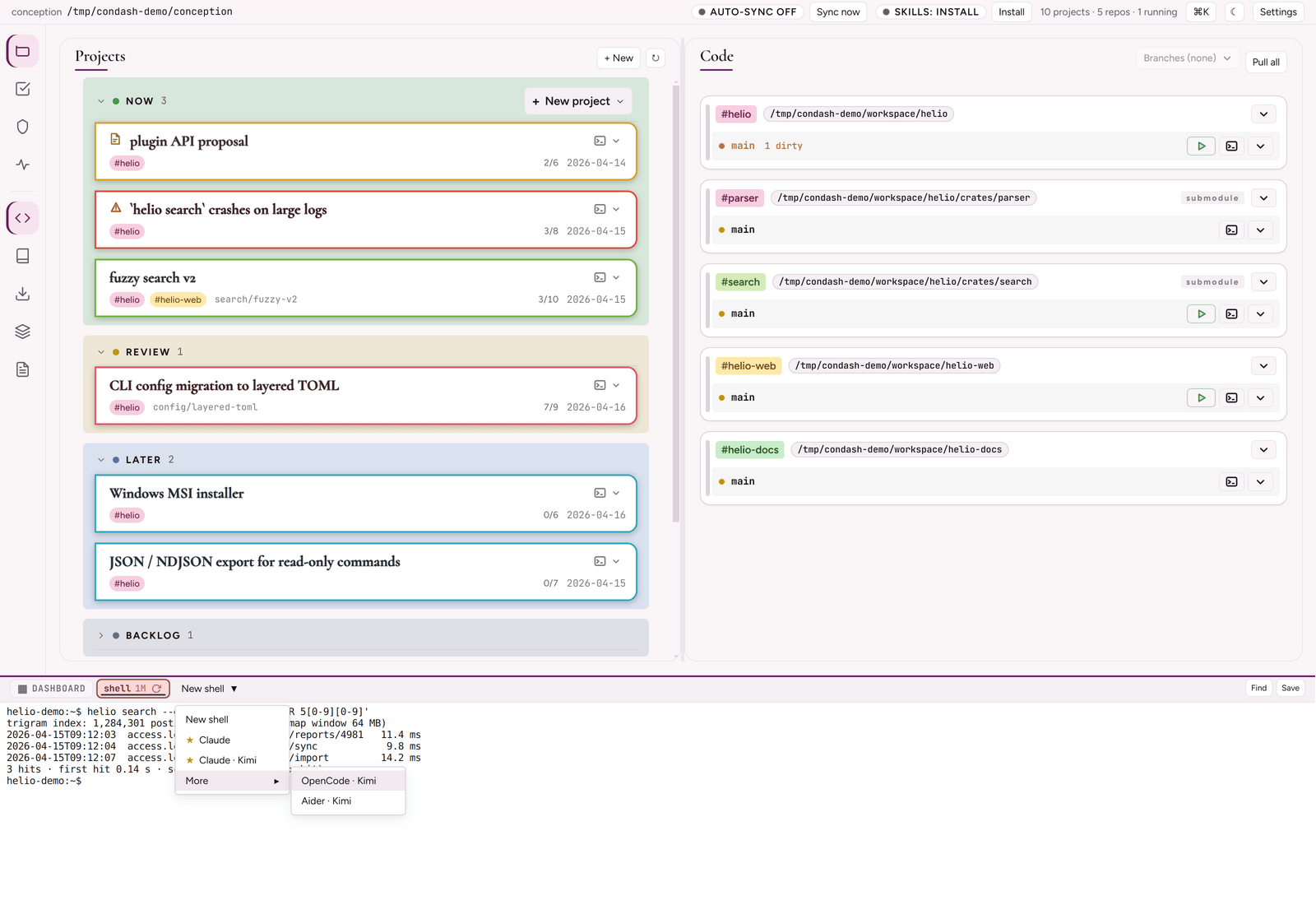
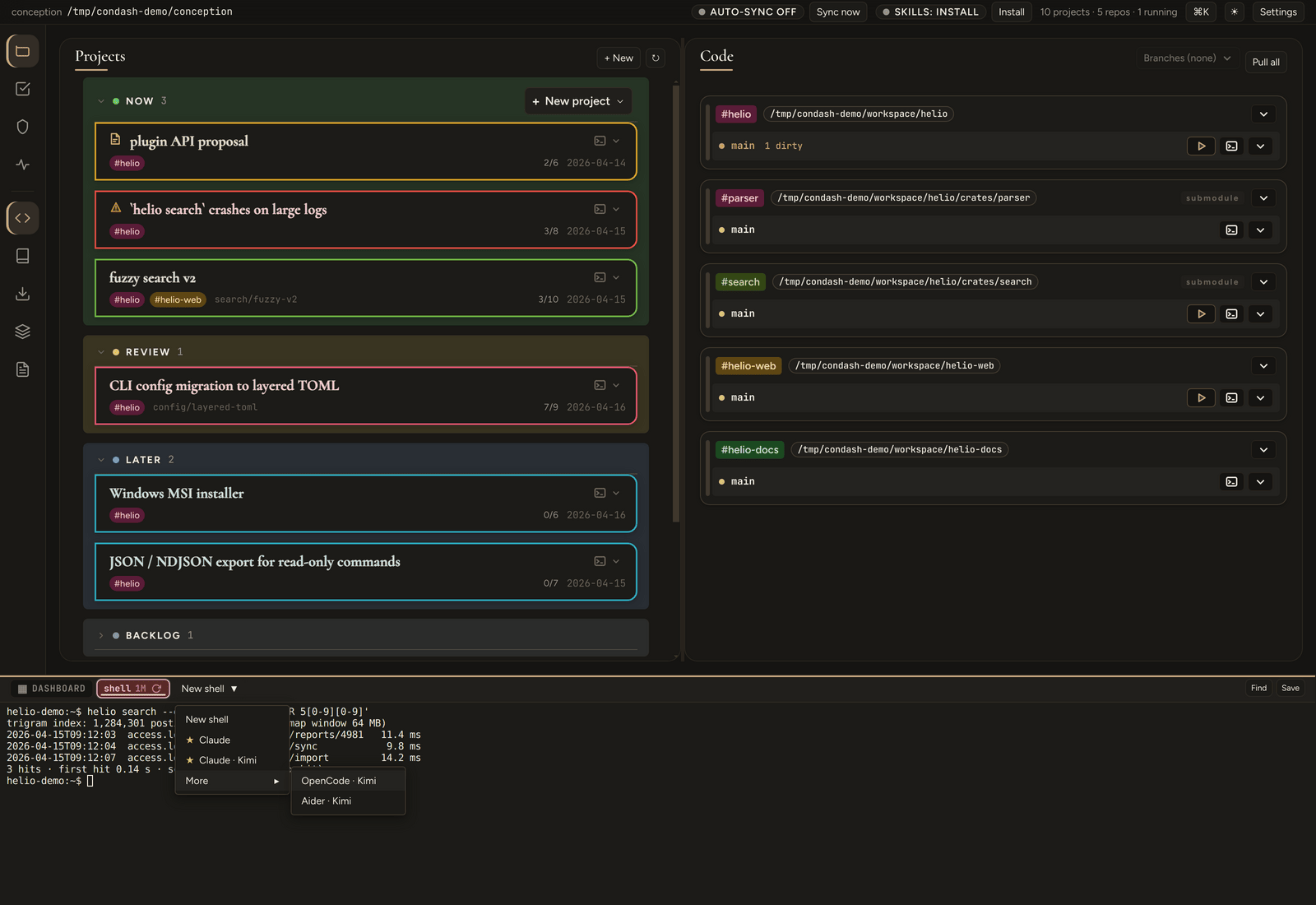
Mark an agent "favorite": true and the dropdown lists it inline with a ★; everything else moves under a More ▸ fly-out. With no favourite marked, every agent lists inline.
See also
- Use the embedded terminal — the spawn dropdown and tabs that run these agents.
- Config files — the
agentssettings list. - Tasks pane — bind a reusable prompt to an agent (opened with the top-bar Automations button).