Deliverables and PDFs
Audience. Daily user.
When to read this. Your item produces a tangible output — a report, a design doc, an incident post-mortem — and you want it to show up on the card with a download link and an embedded viewer.
Deliverables are a first-class concept: a ## Deliverables section in a README lists one or more artifacts, and condash renders them in the expanded card, in the cross-project Deliverables pane, and opens each in a type-appropriate viewer.
A deliverable item can be any local file (PDF, Markdown, HTML, image, …), an http(s) URL (e.g. a deployed page), or a [[wikilink]] to another conception item. PDF-only was the pre-3.20 behaviour.
The ## Deliverables section
Add to your README:
## Deliverables

- [Plugin API proposal — current draft](deliverables/plugin-api-proposal.pdf) — Distributed to the team for review, 2026-04-15.
- [Appendix A: risks](deliverables/plugin-api-proposal-appendix-a.pdf)
- [Live demo](https://plugin-api.example.com) — staging deploy
- [[2026-04-10-plugin-api-proposal]] — superseding design
Per line, one of:
- [<label>](<target>) — <optional comment>      # local file or http(s) URL
- [[<slug>]] — <optional comment>                # wikilink (or [[<slug>|<label>]])
- Label — text shown on the card and in the viewer header. For a bare wikilink the slug is used;
[[slug|label]]overrides it. - Target — a local file relative to the item's directory (any extension), an absolute
http(s)://URL kept verbatim, or a[[slug]]wikilink to another conception item.mailto:and in-page#anchorlinks are ignored. - Comment (optional, after
—,-, or:) — a one-line note shown next to the label, for any item type.
Multiple deliverables per item are fine; each renders as its own row in the Deliverables section of the item modal.
How each item opens
The viewer is chosen by the item's type:
| Item | Opens in |
|---|---|
[[slug]] wikilink |
the linked conception item, navigated to within condash |
http(s)://… |
your external browser (shell.openExternal) |
.pdf |
the in-app PDF viewer modal |
.html / .htm |
the in-app HTML preview (sandboxed condash-file:// webview), with a Rendered / Source header toggle |
.md / .markdown |
the in-app note modal, read-only |
.mdx |
the in-app visual-note viewer — typed blocks (wireframes, diffs, data models, …) with a Rendered / Source toggle; see the visual notes guide |
images (.png / .jpg / .svg / …) |
the in-app image viewer, fit-to-window |
text / source code (.txt / .json / .css / .js / …) |
the in-app note modal, read-only, syntax-highlighted |
| anything else (audio, video, archives, binaries) | your OS default application (shell.openPath) |
Every in-app viewer's header carries a ⤷ Reveal in file manager button alongside the ↗ Open in OS default escape hatch.
The HTML preview loads the file over the condash-file:// scheme, so relative references inside it (<img src="sibling.png">, relative CSS/JS) resolve against the deliverable's own directory. Root-absolute paths (/assets/…) and remote assets may not load under the renderer's CSP — use ↗ Open externally for those.
Filename convention
Place PDFs under <item>/deliverables/. The directory exists for exactly this: to separate generated outputs from editable notes. condash scans the filesystem lazily, so the directory only needs to exist when at least one deliverable is linked.
Slug the filename to match the item: <item-slug>.pdf for the primary deliverable, <item-slug>-<suffix>.pdf for secondary ones. This keeps them discoverable in bare ls listings without peeking inside each item.
What the modal looks like
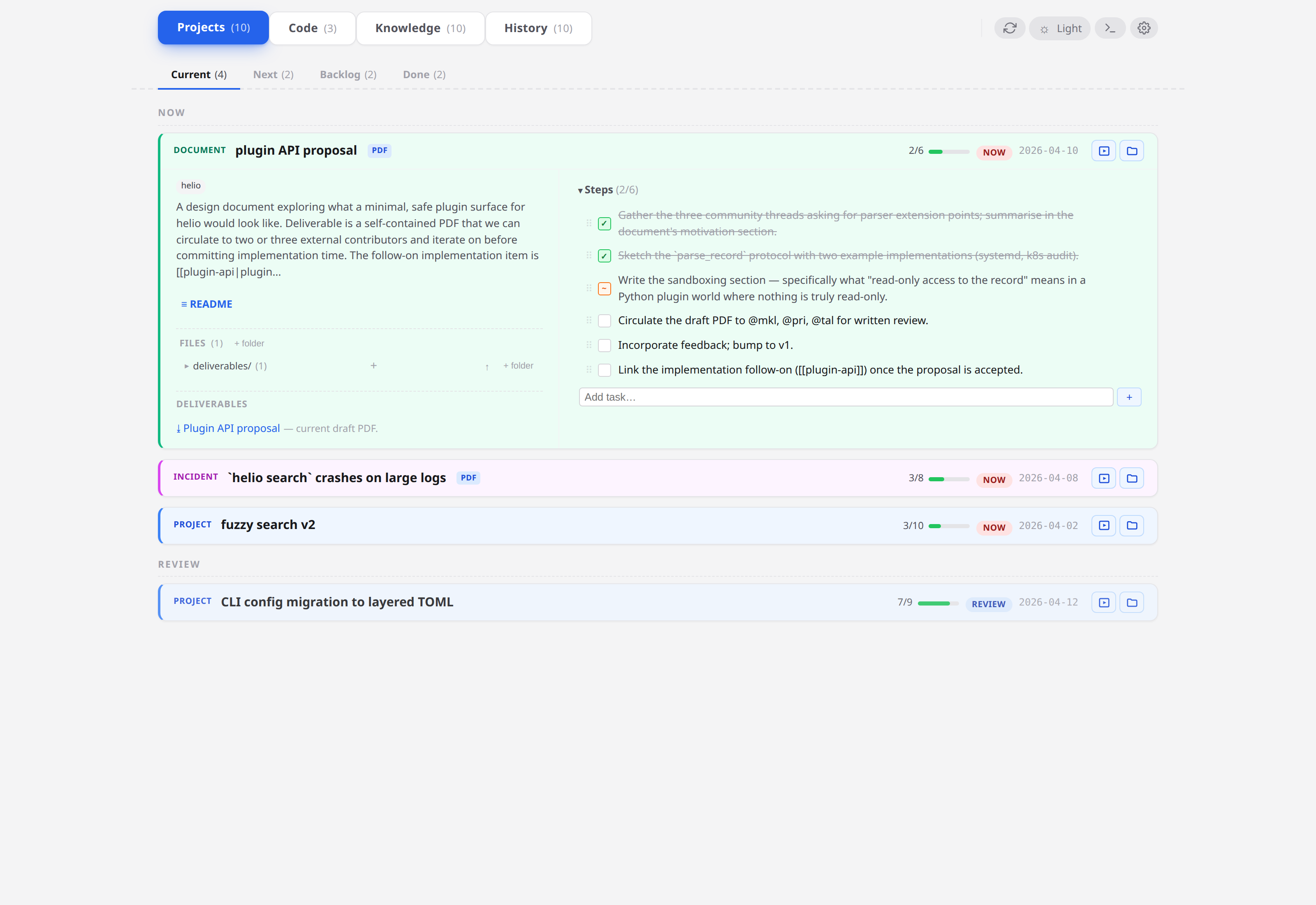
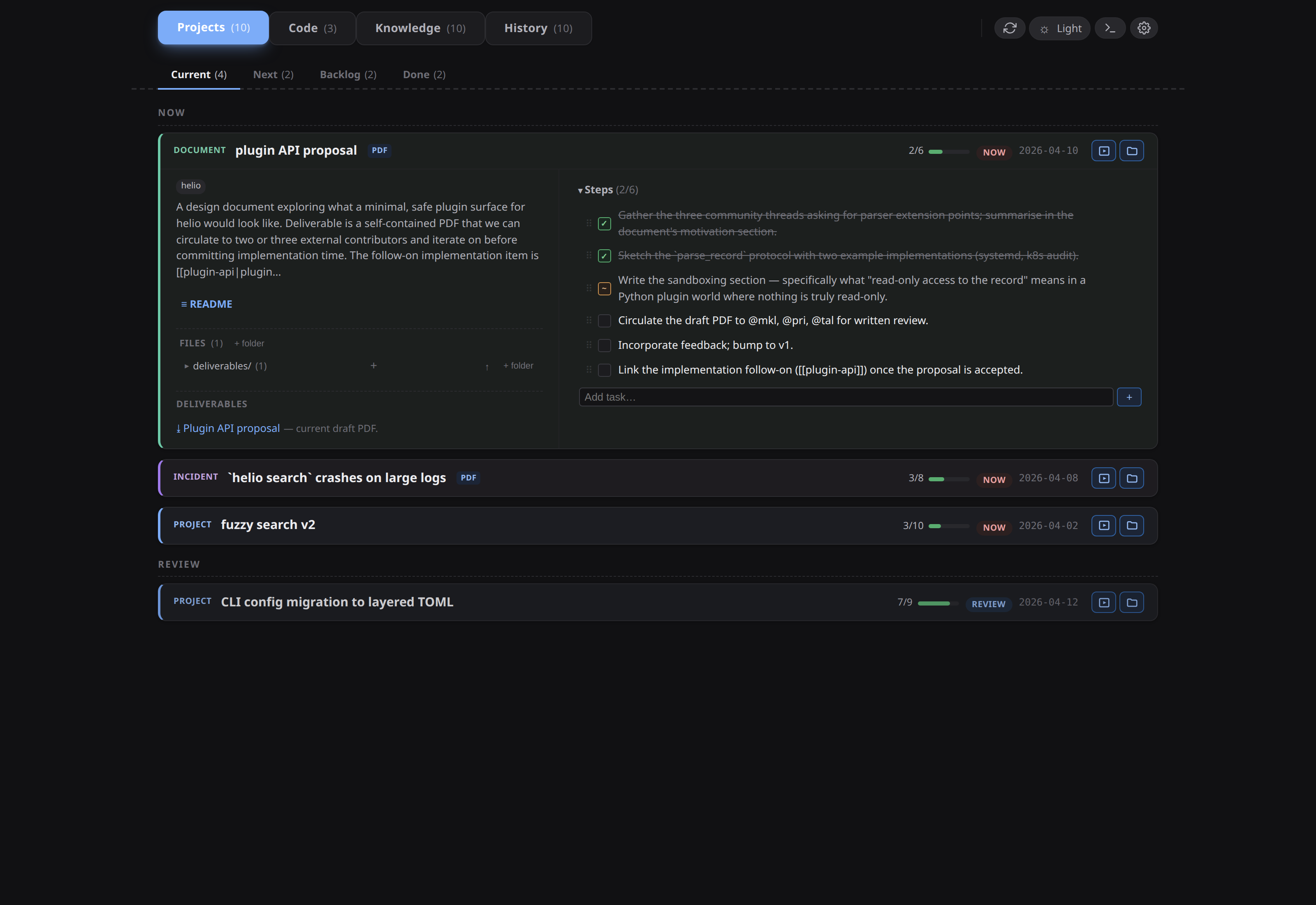
- Open the item modal (click the card). Below the body, the Deliverables section lists every entry with its label, description, and resolved path.
- Click a row to open the PDF in an embedded viewer modal.
- The viewer's header has an ↗ Open in OS default viewer button (
shell.openPath, so whichever app your OS associates with.pdf) and an × Close button.
Two viewers, two schemes. PDFs render in an Electron <webview> pointed at a file:// URL, so Chrome's built-in PDF engine does the work — no bundled pdf.js, no external dependency, works offline. HTML deliverables use a different path: a sandboxed webview on the condash-file:// scheme, so relative assets resolve against the deliverable's own directory (see below).
Generating the PDF
The quick path is built in. Open any Markdown note — or visual note (.mdx) — in the viewer and click Export as PDF in the header. condash prints the rendered note — code highlighting, task lists, Mermaid diagrams, embedded images — through a save dialog that defaults to <note-name>.pdf next to the source. No external tools, and the export always uses a light, print-oriented style regardless of the app theme. For most deliverables this is the whole story.
Reach for a toolchain only when you need finer typographic control — LaTeX-grade output, section numbering, a house template. condash has no opinion about which one; the shape is:
- Write the body as Markdown under
<item>/notes/<name>.md. - Convert it into
<item>/deliverables/with whatever you already use. A pandoc baseline:
cd <conception_path>/projects/2026-04/2026-04-08-plugin-api-proposal
pandoc notes/draft.md \
  --pdf-engine=xelatex \
  --toc --number-sections \
  -o deliverables/plugin-api-proposal.pdf
Add --filter mermaid-filter if your notes carry Mermaid diagrams, and -V mainfont=... for a font that covers your accents.
Refresh the dashboard; the deliverable row picks up the file. No extra registration step.
Opening PDFs in your OS viewer
Click ↗ in the embedded viewer's header. condash hands the file to shell.openPath(), which uses whatever app your OS has registered for .pdf (Evince / Okular on Linux, Preview on macOS, the bundled Reader / Acrobat on Windows). On Linux you can change that default through xdg-mime default; condash itself does no path resolution.
Note. The schema accepts a
pdf_viewer: string[]key (a fallback chain like["xdg-open {path}", "evince {path}"]) in the per-machinesettings.json— it is a personal, global-only key, so a conception's.condash/settings.jsoncarrying it is rejected. It is currently parsed and ignored: nothing reads it, the value is preserved across saves for a lossless round-trip, and the OS default wins regardless. If you want the chain honoured, file an issue or open a PR; the schema slot is already there.
Deliverable lifecycle
Items that ship a deliverable go through a pattern:
- Early —
## Deliverablessection exists but is empty or links to a stub PDF that says "draft pending". - Review — regenerate the PDF from the latest Markdown; status moves to
review; share the PDF with reviewers. - Final — one last regeneration after review comments land; status moves to
done.
If the deliverable is a living document (a standards doc, a runbook), skip the done status — leave the item in review and keep regenerating when needed. The status model is yours to interpret.
Do not check multiple versioned PDFs into the deliverables directory (…-v1.pdf, …-v2.pdf). Keep one canonical filename and rely on git for history. The card renders every entry listed in the section — of any type, not just PDFs — never every file on disk.
Next
- Search — a
.pdfis not an indexed extension, so neither its text nor its path is searchable. Keep the source Markdown innotes/if you want the content findable. - The Deliverables pane — the same entries aggregated across every project.