The knowledge tree
Audience. Daily user.
When to read this. Your conception tree has grown, you keep writing the same note twice across items, and you want a place for durable reference material that outlives any one project.
knowledge/ is a sibling of projects/ under your conception root. condash walks it recursively and renders it as the Knowledge pane — a plain file explorer for durable docs that don't belong to any single item.
What goes there
Unlike item notes (which belong to one project and age out of relevance when the project closes), knowledge/ content is for material that stays useful across items:
- Team conventions, coding standards, decision records.
- Topic deep-dives written once and linked from many items.
- Per-app operational knowledge — how to run, deploy, debug.
- External reference material you want to keep offline with the rest of the tree.
If you find yourself copy-pasting the same explanatory paragraph into three different item notes, extract it to a knowledge file and wikilink into it instead (see Link items with wikilinks).
Suggested layout
A shape that has held up in practice:
knowledge/
├── index.md                 # optional — overview / entry point
├── conventions.md           # team-wide rules, picked up from session
├── apps.md                  # short per-app descriptions
├── topics/
│   ├── index.md
│   ├── ops/
│   │   ├── index.md
│   │   └── dev-ports.md     # nested arbitrarily deep — condash doesn't cap depth
│   ├── security/
│   │   ├── index.md
│   │   └── legal-privacy.md
│   └── testing/
│       ├── index.md
│       └── playwright-sandbox.md
├── internal/
│   ├── index.md
│   └── helio.md             # per-app internal runbook
└── external/
    └── index.md
The three-folder split (topics/, internal/, external/) is not enforced by condash — it's a convention:
topics/— cross-cutting technical reference. Sub-categorise further when it helps (topics/ops/,topics/security/,topics/testing/, …); condash renders any depth.internal/— per-app operational knowledge that only makes sense to the team.external/— references copied in from outside (upstream docs, vendor runbooks).
Put conventions.md at the root because it's the first thing a new teammate opens.
There is no cap on subdirectory depth — knowledge/topics/ops/dev-ports.md works the same as knowledge/conventions.md.
One consequence worth knowing before you nest deeply: wikilinks key off the basename alone, at any depth. knowledge/topics/ops/dev-ports.md is [[dev-ports]] and nothing else — the directories are not part of the link target, and two files with the same basename in different subtrees collide. See Link items with wikilinks.
How condash scans the tree
On every render condash walks knowledge/ recursively:
- Every
.mdfile becomes a node. - A file named
index.mdbecomes the index card for its directory — its title and first paragraph are shown at the top of that level. - Non-markdown files are skipped.
- Dot-files and dot-directories are skipped.
- Empty subtrees (no
.mdanywhere below) are pruned so the explorer doesn't render lone headings.
Titles come from the first # Heading line of the file. If the file has no top-level heading, the filename (minus extension, spaces for hyphens) is used.
The Knowledge pane
Knowledge is a right-slot working surface, sharing that slot with Code, Resources, Skills, and Logs. Open it from the activity rail on the left edge, from View → Show Knowledge, or with Ctrl+Shift+K. (The status bar along the top has no pane switcher.)
The explorer shows the tree's top level as tiles, with subdirectories as collapsible folders:
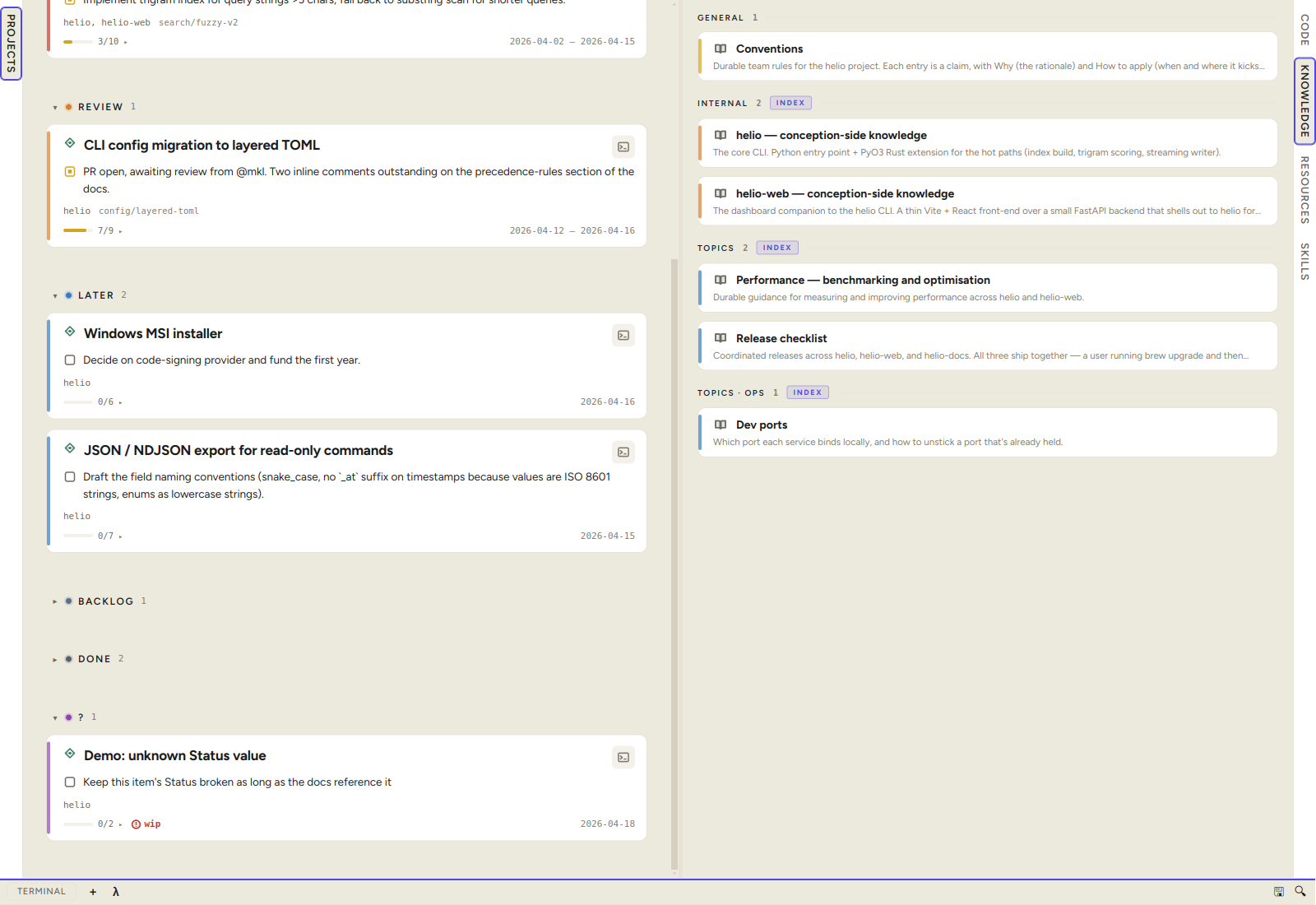
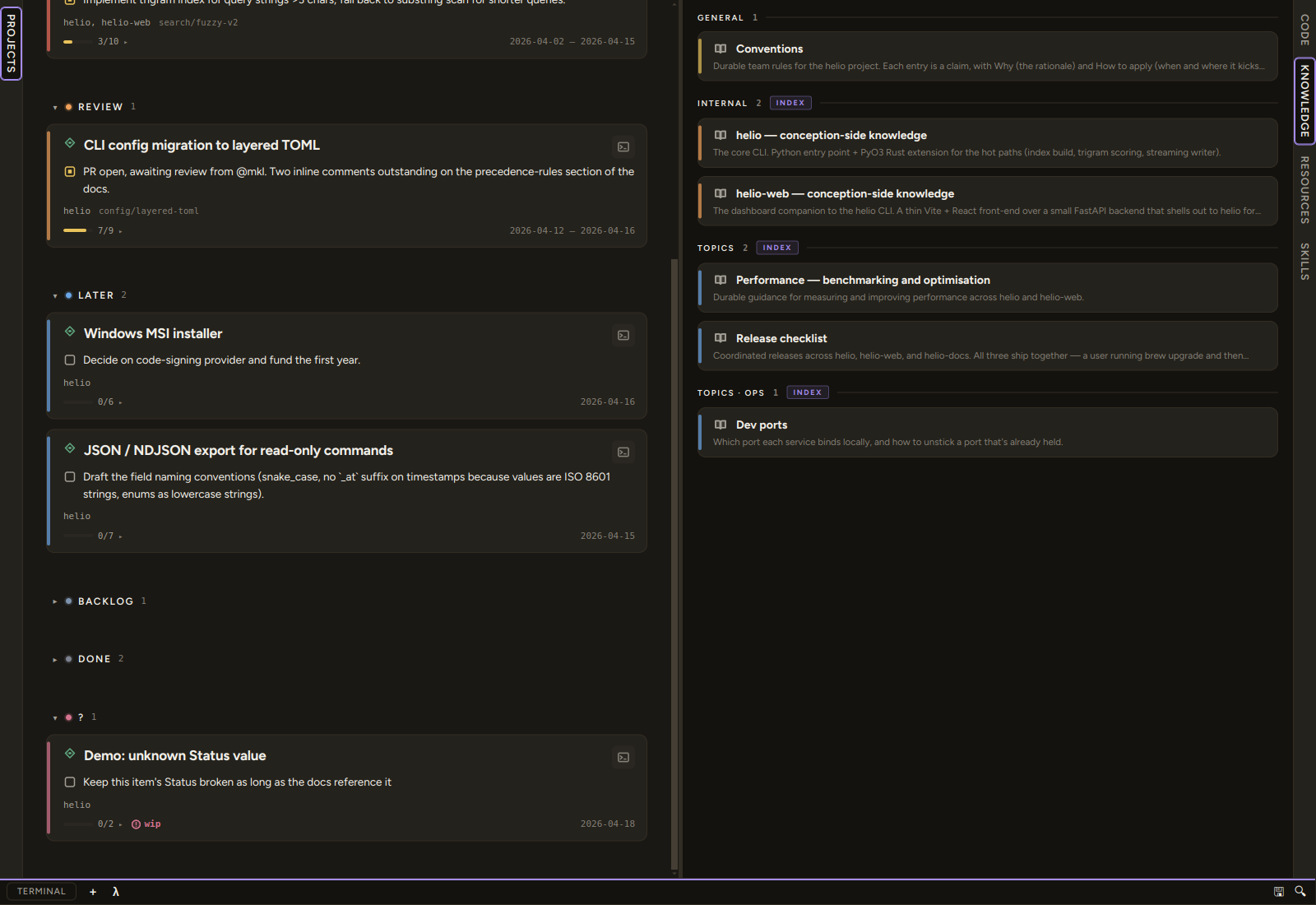
Click a card to open the file. Click a folder header to expand it; the folder's index.md (if any) renders as an INDEX-badged summary row at the top of that level. Each directory header carries the count of .md files directly inside it — INTERNAL 3, TOPICS 3, TOPICS · OPS 2 in the shot above. The tree root itself has no header and no total: what you see is the top level's contents, not a summary of them.
A card carries a bucket-coloured stripe (general / internal / topics / external, derived from the top-level directory), the file's title, and its first-paragraph summary.
Verification stamps
A knowledge file can carry a verification date — the last time somebody checked its claims still hold. When present, the pane renders it as a Verified <date> chip on the file's card, and as a bare date on a directory's INDEX row, with the full date in the tooltip. The chip is colour-graded by age:
| Age | Reads as |
|---|---|
| under 90 days | fresh |
| 90 days – 1 year | stale |
| over a year | old |
That grading is the whole point of the mechanism: a knowledge tree with no freshness signal quietly rots, and a year-old runbook that looks the same as yesterday's is worse than no runbook. The CLI applies the same bar as the chip: condash knowledge verify (and the stale-verification audit check, which shares its engine) flags any stamp older than the freshness threshold of 90 days — the same cutoff that turns the chip stale (--max-age on verify overrides it). The chip is a coarse glance for browsing, verify is the enforcement point, and the two agree on what counts as stale: a stamp that reads stale on the chip is the same stamp verify flags. The chip's over-a-year "old" tier is a display-only distinction for browsing — verify treats everything past the 90-day window as one stale class.
A file may carry several stamps — one per section is the recommended shape when sections were verified on different dates. Freshness is then judged on the oldest of them, so an aged claim cannot hide behind a recently re-stamped header, and every reader agrees on which date describes the file: the chip, knowledge tree, and verify all show the oldest. verify additionally names the newest stamp and its line, so a flagged file that has been partly re-verified reads as what it is — "section 4 is old", not "nothing here has been read in months".
Creating files in place
The pane is not read-only. Every directory header carries two buttons:
+ md— create a new Markdown file in that directory, naming it in a prompt. The new file opens straight away.+ dir— create a subdirectory.
Both write directly into the tree, so the tree stays the source of truth — there is no import step and no separate "add to index" action.
Writing style
Three conventions that make the knowledge pane usable at scale:
- Give every file a real
# Heading. Search weights an H1 hit twenty times a body hit, and the pane uses it as the card title — a file whose H1 is# Notesis unfindable and unreadable at once. A one-sentence "what this is" line under it becomes the card's summary. - Cross-link with wikilinks, not relative paths.
[[pdf-pipeline]]survives the file moving between subtrees;../../knowledge/topics/pdf-pipeline.mddoes not. Remember the target is the basename only — no directories, no.md. - Keep basenames unique across the tree. Because wikilinks key off the basename, two
index.md-adjacent files calledsetup.mdin different subtrees are one collision waiting to happen.
Use index.md files as signposts, not walls of prose. Two lines of "what's here, pick the right subtree" is worth more than a comprehensive TOC — the explorer already shows the TOC visually.
Gardening the tree
A tree that only ever grows quietly rots: duplicates accumulate, files outlive their purpose, and single-app notes drift in disguised as topics. /knowledge garden is the whole-tree improvement pass — it audits every body file for duplicates, app-docs-in-disguise, oversized or stub files, index/keyword quality, and stale or broken references, then proposes a ranked report of changes.
garden does not run anything new — it orchestrates the existing CLI verbs (condash knowledge tree / verify, condash audit --include all, condash applications list) plus a full read-pass of every file, and it applies only the batches you approve. Want the mechanical sweep alone — stamps, LFS, orphaned index entries, dangling links? That is /knowledge verify; garden subsumes its signals as the floor and adds the content-level read on top.
Optional tree
The knowledge/ directory is optional. When it's missing the rail item stays where it is and the pane renders an empty state — "No knowledge/ directory under the selected conception path." There's no setup step to "enable knowledge mode"; the directory's presence is the signal.
To start: mkdir -p <conception_path>/knowledge and add a conventions.md. Refresh the dashboard, and the tree appears.
Search
Knowledge is one of the four Markdown sources in the search modal (Ctrl+K / Ctrl+Shift+F) — there is no History pane. Every .md under knowledge/ is indexed at any depth, and ranking keys off where in the file the match landed: a hit in the H1 is worth twenty in the body. See Search for the weights.
Next
- Link items with wikilinks — cross-link from an item's notes into
knowledge/so the reference material is one click away. - Search — find that convention you half-remember writing six months ago.